
Digital marketing is a form of marketing through which you could advertise to people digitally.
Digital marketing leverage different channels like search engines, websites, social media platforms, emails and mobile applications. It would give marketers the opportunity to interact with and understand their audience better and to increase the trust in their brand. Digital marketing would also show marketers advertisements to people based on their actions and preferences on the Internet while being less expensive than traditional forms of advertising.
There are also many types of digital marketing types like content marketing, search engine optimization, pay per click, social media marketing, email marketing and affiliate marketing.
Let’s make an example and set up a digital marketing campaign for an e-commerce website.
1- First, create content like blogs, videos, infographics and case studies so that we could generate audience interest in the brand’s products or services. This is content marketing.
2- Next, we needed the audience to actually see this content. The first step is to create content on specific search keywords that were relevant to the target audience. Also, we should make optimizations on the website and have credible websites linking back to the content. This was SEO or search engine optimization.
3- We can also drive traffic to the website with advertisements, but for this, we would have to pay a certain fee. Each time the ads were clicked, we could have text ads that show up in search engine results, image ads and video ads that show up on websites and much more. This was possible with the help of PPC or pay per click.
4-Social media platforms like LinkedIn, YouTube, Facebook and Instagram are famous. We would use these platforms to advertise the brand’s products or services with posts, images, videos and more to bring out the brand’s story and engage with the brand’s audience, who spend a lot of time on social media. Like BBC, he could use the platform to advertise the brand’s products or services with text, image and video ads that needed to be paid for. That’s social media marketing.
5- We needed to keep the audience engaged, nurture them to make sure they purchased the product. For this, we would send them emails that help them better understand the products they visited on the website and assist them in the buying process. We would also send emails to advertise his products or services to potential customers. That is with email marketing.
6- And finally, although Joey was able to grow the brands funnel, he wanted more traffic from third party websites. This could be achieved with affiliate marketing affiliates would promote the brand or product to their audiences for free, with the help of email, sign-ups, registrations, conversions, subscriptions, etc..
Terms
- Content marketing
- Social media marketing
- Advertising
- Email marketing
- E-commerce
- Search Engine Optimization
- Affiliate marketing
- Bounce rate
- Landing page
Market Segmentation
1. Define Your Overall Market: Begin by gathering data on the total population or universe that your company wants to target.
2. Identify Common Attributes: Look for common characteristics, such as age, gender, income, location, education, employment, or hobbies.
3. Determine Segmentation Criteria: Establish specific criteria in order to define your target market.
4. Research and Analyze Segment Profiles: Gather demographic, psychographic, and behavioral data to understand how different buyers interact with the product.
5. Select the Segments to Target: Evaluate your segments to decide which ones you will focus on.
6. Develop Positioning Strategies: Use the information you have gathered to create effective marketing messages tailored to each segment.
7. Implement and Monitor Progress: Set goals and measure your performance over time. Monitor the success of each segment to adjust future strategies as necessary.
Funnel
A funnel, in marketing terms, is the journey potential customers go through to become customers. It’s the process of turning leads into customers by guiding them through the sales process. The funnel includes stages such as awareness, interest, consideration, intent, evaluation, and purchase. Each stage of the funnel is designed to move prospects closer to making a purchase.
Leads:
Inbound leads come to an organization directly from contacts who have reached out via the website or other sources as a result of marketing efforts. e.g. SEO, Content, SEM etc
Outbound leads come from an organization’s outbound sales and marketing efforts. These leads have not contacted the organization but have been contacted directly by sales and marketing staff. e.g. Email, Cold Calling,
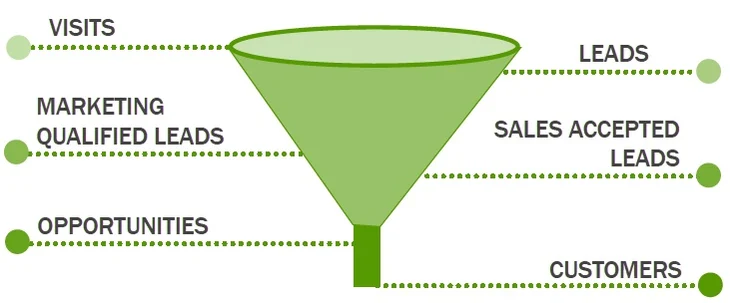
Conversion rate is the percentage of leads that move down and across the marketing funnel to become paying customers. This is used as a measure of success for any marketing strategy and should be monitored throughout the funnel process. It can also be calculated for individual stages of the funnel. Higher conversion rates at each step of the funnel show that your marketing efforts are working and that prospects are progressing through the funnel. e.g. The conversion rate for ads or links is the percentage of people who click on the ad or link.
– Cost-Per-Action rate (Acquisition)A cost per action (CPA) is the total cost spent to receive the required actions by your customers. This action is typically a purchase, registration, sign-up and many more.You can calculate the CPA by following the below formula:CPA = MC / ACPA is the cost per action. For example, $20 per action.MC is the marketing cost. A is the number of actions. The average cost per action (CPA) is calculated by dividing the total cost of conversions by the total number of conversions. For example, if your ad receives 2 conversions, one costing $2.00 and one costing $4.00, your average CPA for those conversions is $3.00.
– Cost-Per-Click (CPC) bidding means that you pay for each click on your ads. For CPC bidding campaigns, you set a maximum cost-per-click bid – or simply “max. CPC” – that’s the highest amount that you’re willing to pay for a click on your ad (unless you’re setting bid adjustments, or using Enhanced CPC). Your max. CPC is the most that you’ll typically be charged for a click, but you’ll often be charged less. That final amount that you’re charged for a click is called your actual CPC. If you enter a max. CPC bid and someone clicks your ad, that click won’t cost you more than the maximum CPC bid amount that you set.
You’ll choose between manual bidding (you choose your bid amounts) and automatic bidding (let Google set bids to try to get the most clicks within your budget). CPC pricing is sometimes known as pay-per-click (PPC).
– Click-through rate (CTR)is a ratio showing how often people who see your ad or free product listing end up clicking it. Clickthrough rate (CTR) can be used to gauge how well your keywords and ads, and free listings, are performing. CTR is the number of clicks that your ad receives divided by the number of times your ad is shown: clicks/impressions = CTR. For example, if you had 5 clicks and 100 impressions, then your CTR would be 5%. Each of your ads, listings, and keywords has its own CTRs that you can see listed in your account. A high CTR is a good indication that users find your ads and listings helpful and relevant. CTR also contributes to your keyword’s expected CTR, which is a component of Ad Rank. Note that a good CTR is relative to what you’re advertising and on which networks. You can use CTR to gauge which ads, listings, and keywords are successful for you and which need to be improved. The more your keywords, ads, and listings relate to each other and to your business, the more likely a user is to click on your ad or listing after searching on your keyword phrase.
-Engagement rate (the average time spent engaging with an ad divided by the total number of impressions). An engagement occurs when a consumer engages with an ad (for example, watching a video ad for at least 10 seconds). Engagements can help you understand how well your ad is performing. Relevant, highly-targeted ads with attractive content can encourage viewers to engage more deeply with your brand.
Google keyword match
Google keyword match types are used to determine how closely a search query must match your chosen keywords in order for your ad to be eligible to appear.
- Broad Match: When you use a keyword in broad match, your ad can appear for searches that include variations, synonyms, misspellings, and related searches. For example, if your keyword is -running shoes- your ad could appear for searches like -buy sports shoes- or -best jogging sneakers- It offers the widest reach but may also include less relevant searches. No Match Symbol
- Broad Match Modifier: By adding a “+” symbol in front of specific terms within a broad match keyword, you create a broad match modifier. This tells Google that the term must be included in the user’s search query. For example, if your keyword is +running +shoes your ad could appear for searches like “buy running shoes” or “best running sneakers.” This match type provides a balance between reach and control. No Match Symbol
- Phrase Match: With phrase match, your ad will appear when the user’s search query contains the exact phrase or a close variation of it. The search terms must be in the same order as the keyword, but other words may be present before or after the phrase. For example, if your keyword is “running shoes,” your ad could appear for searches like “blue running shoes” or “discounted running shoes.” This match type offers more control than broad match. The correct syntax for writing phrase match keywords is by adding quotes (“ ”) around the phrase.
- Exact Match: Exact match is the most specific match type. Your ad will only appear when the user’s search query exactly matches your keyword or a close variation. Close variations include plurals, misspellings, and other minor variations. For example, if your keyword is [running shoes], your ad could appear for searches like “running shoes” or “runing shoes.” This match type offers the highest level of control but may have a narrower reach. The correct syntax for writing exact match keywords is by adding square brackets ( [ ] ) around the phrase.
- Negative Match: Negative match is not a specific keyword match type, but it is important to mention. By adding a “-” symbol in front of a keyword, you can exclude your ad from showing when certain words or phrases are present in the search query. For example, if you add the negative keyword “-free,” your ad will not appear for searches like “free running shoes.” Negative match helps you exclude irrelevant searches and focus on more relevant ones.
4C
4C stands for Customer, Cost, Communication, and Convenience and is a popular model for marketing. It encourages marketers to consider the needs of each of these key areas when making decisions about their marketing strategy. It encourages marketers to think from a customer-centric perspective. The 4 Cs help marketers find a balance between customer demands, cost constraints, marketing communications, and delivering convenience.
4P
The building blocks of an effective marketing strategy include the 6 P’s of marketing
1. Product: Identifying and offering the right product to fill customer needs.
2. Price: Setting prices that accurately reflect the value of the product or service.
3. Promotion: Creating visibility for the product or service.
4. Place: Ensuring the product or service is in the places customers expect to find it.
5. People: Developing a skilled and motivated team to deliver excellent service.
6. Process: Establishing consistent and efficient processes.
Five key areas that need to be considered to generate appointments from LinkedIn
1- The first most important strategy and mistake are to make sure the outreaching only to people who could be your ideal actual client. so make sure that if you are a CEO, Co-Founder or maybe engineer then you’re just ultimately keeping within your network in terms of the outreach that you do, not your friends, not your family, not colleagues that you’ve met through a coworking space, but actually focused upon your ideal business client. That’s a key thing, because therefore, each time that that person, let’s call it Frank, who’s a managing director at Frank’s local gym when Frank likes your actual comment or your status or connects with you, you’re also going to get access to Frank’s network, who probably happens to be also other gym-based business owners as an example. So the first key thing that makes sure you outreaching specifically potential clients of your actual business.
2- The second thing is that also works the other way around. The large majority of people who request to be your friend are not an ideal client yet. A mistake that. commonly made and it’s still sometimes a mistake that I continue to make as I accept people’s actual requests on the basis of the desire to just expand my network. We should Only accept people that are relevant to actual business.
3- The third thing is LinkedIn, boolean search, LinkedIn, boolean search. It gives incredible power to use. so I could target through LinkedIn Sales Navigator in combination with LinkedIn Boolean Search. with the use of LinkedIn boolean search, there are so many combinations of actual searches that you could run.
5- The final point is we should find some really relevant individuals who could become potential clients. So feel free to connect with those people and feel free to have a sequence that makes sense for people that have visited your profile in terms of response that you could fire back.
4- Although it is not free, LinkedIn sales navigator is a powerful tool for education and the background and use that with boolean search to target people based upon a spot. You could target people that are like something e.g. tennis. With LinkedIn boolean search we can narrow down the targeted actual segment.
Pipeline
Sales pipelines are visual representations of sales stages. It outlines the steps and stages of a sale from initial contact with a prospect to closing a deal.
1) Prospecting: Identifying potential leads and initiating contact.
2) Qualifying: Determining if prospects meet your requirements.
3) Needs Assessment: Evaluating customer needs and pinpointing pain points.
4) Presentation: Communicating the value of your product or service.
5) Negotiation: Finalizing the details and closing the deal.
6) Follow-up: Setting up post-deal touchpoints to ensure satisfaction.
We can simplify it to 3 steps
- Discovery is the process of understanding and uncovering the needs of a customer.
- Demo is a visual demonstration of how a product or service works.
- Proposal is an offer to provide a solution or product to a customer to meet their needs.
It could also be more complicated with more steps for larger companies. For example Prospecting, Qualifying, Demonstrating Value, Negotiating, Closing and After Sale Services
Marketing Product
Flyers:
A single, unfolded piece of paper, brief and to the point. It contains essential information. The goal is to grab the audience’s attention as quickly as possible. Consequently, the Design tends to be straightforward, focusing on a single message or action.
Brochures:
It is a multi-page (or foldable) document. Formats include bi-fold (2 panels), tri-fold (3 panels), and more. Brochures provide more comprehensive information than flyers. Educate, inform, or persuade the audience about the product. The design is typically more complex than flyers, with a segmented layout to separate and organize information.
Datasheet:
A datasheet contains information about the manufacturer, product, and other relevant details, such as key features and advantages. Users can quickly understand the product’s key selling points this way. A key section is Technical Specifications, which includes detailed product characteristics information. These include electrical properties such as voltage, current, and power. They also include mechanical properties such as dimensions, weight, and material type and performance characteristics such as accuracy, speed, and efficiency. The other section is Application Information, which provides guidelines on how and where to use the product. This section may also have circuit diagrams or use-case scenarios for electronic components. Other sections include safety and handling information, storage guidelines, certifications, and compliance. The datasheet often includes visuals to explain the product’s functionality or to provide dimensions and other specifications as visual references.
Catalogue:
The purpose of catalogues is to list products or services and provide detailed descriptions, sometimes pricing and information regarding orders.
Marketing Product and Pipeline
| Pipeline | Product | Audience |
| Prospecting | Flyer | |
| Qualifying | Brouchure | Brochure |
| Demonstrating Value | Datasheet | Top Floor & Shop Floor |
| Negotiating&Solution | Catalogue | Shop Floor & Top Floor |
| Closing | ||
| After Sale Services |
Email Marketing
Tracking:
- Check if the Email Arrived: If an email is outright undeliverable, you will usually receive a failure notification.
- Check if the Email is in Spam: Check the Message Trace feature in the admin panel to see: Delivery status (Delivered, Quarantined, Failed, etc.) and If the email landed in spam or quarantine.
- Check if the Email Was Opened
Google Tag Manager
Google Tag Manager (GTM)
Think of this as The Middleman. It is a free tool that lets you easily update and manage the “tags” (snippets of code) on your website without needing a software developer. You use it to tell your website what to track.
Google Analytics (GA)
Think of this as The Report. It is a tool that collects and stores data. It shows you who is visiting your site, where they came from, and what they are doing (viewing pages, buying items).
The Difference
- GTM is the tool you use to send the data.
- GA is the place where you see the data.
Simple Analogy: If your website is a supermarket:
- Google Tag Manager is the scanner at the checkout (it captures the information).
- Google Analytics is the sales receipt (it organizes the information so you can read it).
Variables in GTM are placeholders that hold dynamic information. Instead of typing the exact same ID or URL into 50 different tags, you use a Variable.
- As Example:
Constant: Holds your ID (G-0V0...). If you ever change your Analytics account, you only have to update this one variable, and all your tags update automatically.DLV - page_path: Holds the URL (like/aboutor/contact). It changes every time the user moves.
Triggers In GTM: A Tag sits there doing nothing until a Trigger tells it to fire. The Trigger listens for specific events on your website, like a page loading, a button click, or a form submission.
- As Example:
- You created a Trigger called
Custom Event - Page View. It listens for your Angular app to shout, “Hey! The user moved to a new page!” - Without a Trigger, the Tag doesn’t know when to work.
- You created a Trigger called
Tags (The “Action”) in GTM shows “What do you want to do?”. A Tag is the actual worker. It is the instruction that says, “Send data to Google Analytics” or “Send data to Facebook.”
- As Example You created a Tag that says, “Send a Page View signal to Google Analytics 4.”
- Without a Tag, nothing happens. It’s like having a letter written but never mailing it.
Goal: Track Page Views on an Angular (Single Page) App
Since your website doesn’t “reload” like a normal site, we had to build a custom listener to tell Google when the page changes.
The 3 Core Parts We Built
- The “Catcher” (Variable: dlv_page_path)
- What it does: It watches the code for the specific file name page_path sent by your developer.
- Why: This grabs the URL (e.g., /about-us) so we know which page the user is on.
- The “Listener” (Trigger: Custom Event – Page View)
- What it does: It waits silently until the code shouts “page_view!”.
- Why: This tells GTM when a page change has actually happened.
- The “Reporter” (Tag: GA4 Event – Page View)
- What it does: When the Listener hears the shout, this Tag wakes up, grabs the URL from the Catcher, and sends it to Google.
- Why: This is the data you actually see in your Analytics reports.
The Final Structure
- Tag 1: GA4 Config
- Role: The Key.
- Action: Turns the lights on when the website first loads (Initialization).
- Tag 2: GA4 Event – Page View
- Role: The Tracker.
- Action: Sends the specific page data every time the user navigates (Custom Event).
| Variable Name (GTM Label) | Variable Type | Configuration Details | Purpose |
G-Analytics | Constant | Value: G-XXXXXX (Your Measurement ID) | Stores your Google ID in one place so you don’t have to type it every time. |
dlv_page_path | Data Layer Variable | Data Layer Variable Name: page_viewVersion: 2 | Catches the specific URL (e.g., /about-us) sent by your Angular code. |
| Trigger Name | Trigger Type | Configuration Details | Purpose |
Custom Event - Page View | Custom Event | Event Name: page_viewFires On: All Custom Events | Listens for the signal from your app that the user has navigated to a new page. |
| Tag Name | Tag Type | Configuration Settings | Triggering |
GA4 Config | Google Tag | Tag ID: {{G-Analytics}} | Initialization – All Pages (Turns on GA4 when the app loads) |
GA4 Event - Page View | GA4 Event | Measurement ID: {{G-Analytics}}Event Name: page_viewParameter Name: page_locationParameter Value: {{dlv_page_path}} | Custom Event – Page View (Sends the new URL every time the page changes) |
- Life Cycle Collection: This is the standard set of reports that tracks the complete user journey from their first visit to becoming a loyal customer.
- Acquisition: This report shows you exactly where your visitors are coming from, such as Google search, social media, or ads.
- Engagement: This report tells you what users actually do on your site, including which pages they read and how long they stay.
- Monetization: This report tracks all your sales and revenue data if you are selling products or services online.
- Retention: This report measures how often users return to your website after their first visit to see if you are keeping them interested.
A Simple Weekly “Health Check” Routine:
- GA4: Check Pages and screens for low “Engagement Rate”.
- Hotjar: Watch Session Replays (Filter by “Rage click” or “Exit page” on those bad pages).
- Hotjar: Check Surveys for direct user complaints.

 Electrical Engineer