
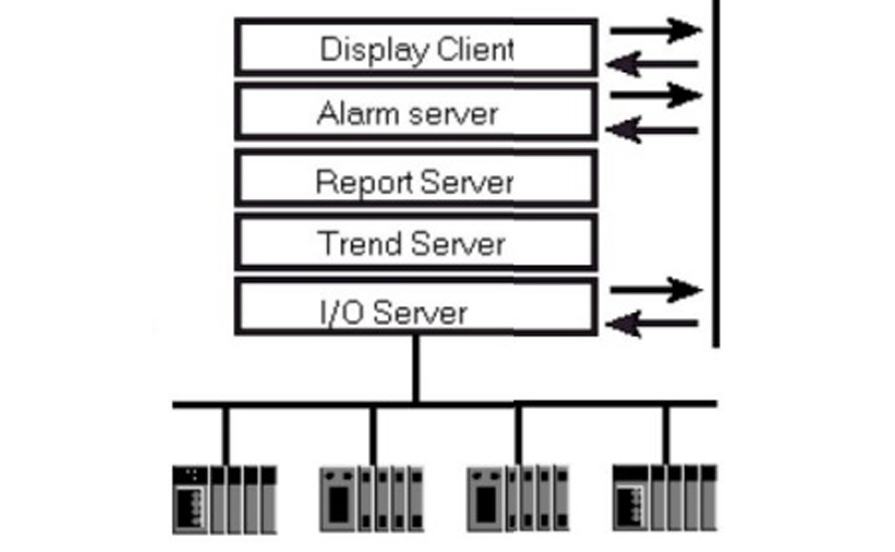
Scada Generation
Monolithic SCADA Systems. Monolithic SCADA systems are closed-loop systems in which the server, communication infrastructure, monitoring and in-system devices (such as controllers, sensors, and actuators) are all integrated. This type of system makes it easy to access and control all components from a single interface. It allows for centralized monitoring and control of industrial processes.
Distributed SCADA Systems. Distributed SCADA systems are based on a distributed architecture, which means that the monitoring and control components (server, computers, communication infrastructure, in-system devices) are connected but do not have to be physically located in the same place. This type of system allows for improved functionality as it can be easily expanded and modified to accommodate changing process requirements. It also offers greater flexibility and scalability due to the distributed architecture.
Networked SCADA Systems. Networked SCADA Systems are systems that use a networked architecture to integrate various components of a system into a larger, more robust framework. This type of SCADA system makes use of computers and digital communication networks (such as Ethernet and Internet Protocol (IP)) to interface with each component of the system. It can be used to control and monitor industrial processes from a single, centralized point of control, and it also offers increased scalability and flexibility.
IoT SCADA Systems. IoT SCADA Systems are SCADA systems designed to integrate real-time data from physical devices (such as sensors, actuators, and controllers) with software-as-a-service and cloud computing. This will allow remote monitoring and control of processes and results in improved reliability and better decision-making. The system also makes use of predictive algorithms and artificial intelligence to simulate the physical system.
Networked Scada Architecture
Architectures for SCADA systems typically are driven by multiple factors. These can range from the number of users/operators that will use the application to the manufacturing process/environment that the application is deployed within. When developing an architecture for a system one should review specific application requirements. These requirements should include items such as the number of clients the implementation will require, the number of IO (data points from PLC’s) that will be required, physically where will these clients be located and do these locations have the necessary network connections to other systems.
In general, a small system could be a certain number of clients that connect to a DA Server and the DA Server communicates with the PLC or other field device. Below represents a small architecture (Wonderware InTouch) depicting this scenario:

NAD
Either with one or two DA servers, changes would be made to the application using WindowMaker on what is typically referred to as an engineering workstation. In a lot of cases, the application is copied directly onto the Windowviewer machine and the Windowviewer is restarted. Another approach to this would be to configure Network Application Development or NAD. NAD is, in simple terms, an automated way to distribute applications. One node, called the Master NAD node, is a central repository for InTouch Applications. It is the source of the application files for all other NAD Client nodes, which get a local copy of the application files. Any node can be the Master NAD (even with no Wonderware software installed.) To configure a node to be a NAD Client all that has to be done is to find the application in the Master NAD, enable NAD, and specify the local directory to store the application files. It is important to make clear that NAD is architecture-independent. In other words, NAD can be used with applications designed to be stand-alone (no communication with other InTouchnodes), Master/Slave applications, or a completely distributed architecture with a Tag Server and Clients with no local tag dictionary but using remote references to the server. What the application does or how it communicates with other nodes is irrelevant to NAD; all NAD does is copy the files to other nodes and update them when the application changes.

Windowmaker
Development environment for InTouch. Using Windowmaker an application developer can create windows that contain graphics that are animated via tags. An InTouch application will interface with PLC’s and other field devices to allow visualization and control of data from the control layer.
Windowviewer
Runtime environment for InTouch. After an application is developed, it can be compiled into Windowviewer. Once compiled, the logic, I/O and other aspects of the application are running and the application becomes available.
OLE: Object Linking & Embedding is a proprietary technology developed by Microsoft that allows Object Linking and Embedding. For developers, it brought OLE Control Extension, a way to develop and use custom user interface elements. For example, upload a photo to an app the photo is an object embedded and linked to another app. The OLE technology is for 90th century
OPC: is OLE for industries! it has OPC UA and Classic version
When we talk about OPC we’re talking about process control how do we do this in the industry how do I take data from machines and share it? Microsoft already had their own standard which is OLE for commercial and consumer products
RDP: Remote Desktop Protocol is a proprietary protocol developed by Microsoft which provides a user with a graphical interface to connect to another computer over a network connection.
DA Server
Device integration is achieved through Data Acquisition Servers (DA Servers). These DA Servers are independent software applications of InTouch and are typically hardware-specific. Usually, it is either the PLC Brand or communication protocol used for PLC communication that determines what DA Server is used. InTouch interacts directly with DA Server reading/writing data to the PLC.
OI Server: OI Servers are the next generation of DAServers. They support newer PLC models and firmware and were rebranded OI Server because of some more advanced features, like being able to run multiple OI Servers of the same type on the same node (multi-instance), due to new functionality available in the OI Core.
Application Server: It is a type of server designed to install, operates and host-associated services and applications for IT services, end-users and organizations. Application servers are network computers that store and run an application for client computers. Application servers, whatever their function, occupy a large chunk of computing territory between database servers and the end-user.
Servlet: A servlet is a Java programming language class that is used to extend the capabilities of servers that host applications accessed by means of a request-response programming model. Webserver and application server communicating with each other through servlet

 Electrical Engineer