

Secure Shell (SSH) is a protocol developed in the mid-90s to securely control one computer from another. To use SSH, you need to install an SSH server on the computer you want to control, and SSH software on the device you are using to connect. Once setup, you can use terminal commands such as LS, CD, MV, CP, and RM to navigate, edit, and manipulate files. There are many other cool things that you can do with SSH, such as SSH tunneling.
Security:
To securely send a note to a neighbor, SSH uses a briefcase. Both parties agree to use this method and the sender puts the note inside the briefcase, locks it with their key, and sends it to their neighbor. The receiver then adds their own lock and key, and sends it back. The sender removes their own lock, and then sends it back to the neighbor, who can unlock their lock and access the note. This way, the briefcase is kept locked at all times, even if it is intercepted.

Tunneling
SSH tunneling is a way to securely connect two computers and forward data from one port to another. This is accomplished by using a local port forwarding tunnel or a dynamic port forwarding tunnel. To use this, the user must type in the appropriate SSH commands in their terminal, which will prompt them to log into their remote SSH server. Once the connection is established, data sent through the tunnel can bypass firewalls and be retrieved on the remote computer. Reverse tunneling can also be used to access a locally hosted website from the internet.
SSH Key
SSH keys are a more secure alternative to using passwords. They consist of two files, a private key and a public key. The private key is kept secret and is used to prove identity, while the public key can be placed anywhere and is used to encrypt data. SSH software is used to access remote servers.
For each public key generated, there is typically a corresponding private key although It is possible to generate multiple public keys from a single private key.
The process of communication between server and client is based on SSH keys. The client has a private key and the server has a public key. When the client wants to connect to the server, the client sends the private key to the server. The server then generates a random string of characters, encrypts it using the public key, and sends it back to the client. The client then uses the private key to decrypt the string and then sends back a calculation of the string to the server. If the server gets the right calculation, then it knows the client has the right private key and grants the client access.
Public keys are mathematically derived from private keys, but the process cannot be reversed. so the private key can NOT be found based on public key
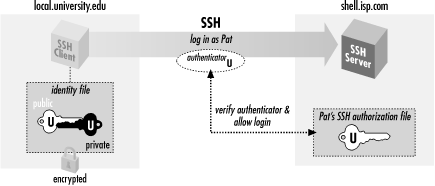
Example
- Generate a key pair on your local machine using your SSH client.
1. Run ssh-keygen on windows command, use “code id_rsa” inside .ssh folder to see the private file, the public key is code “id_rsa.pub”
2. Once the key pair has been generated, you will see two files – the public key and the private key. - Copy the public key to the remote server.
1. There is a file called authorized_keys in .ssh folder in the server. Open it and copy the public key - As the private key is already on your PC
- Or usr@<IP>
SSH-L is a utility that enables users to create a secure connection between two computer networks or hosts. This connection is also known as a “tunnel” and allows data from one network to be securely transmitted over another network without the risk of interception. With SSH-L, users can do port forwarding
ssh -L [mylocalmachinepor]:[resourceon] [username]@ipaddress command will create a secure tunnel between two computers.
ssh -L 8201:172.17.0.1:2002 [username]@ipaddressIt will forward all traffic from 172.0.1:2002 to my local machine port 8201.

 Electrical Engineer