
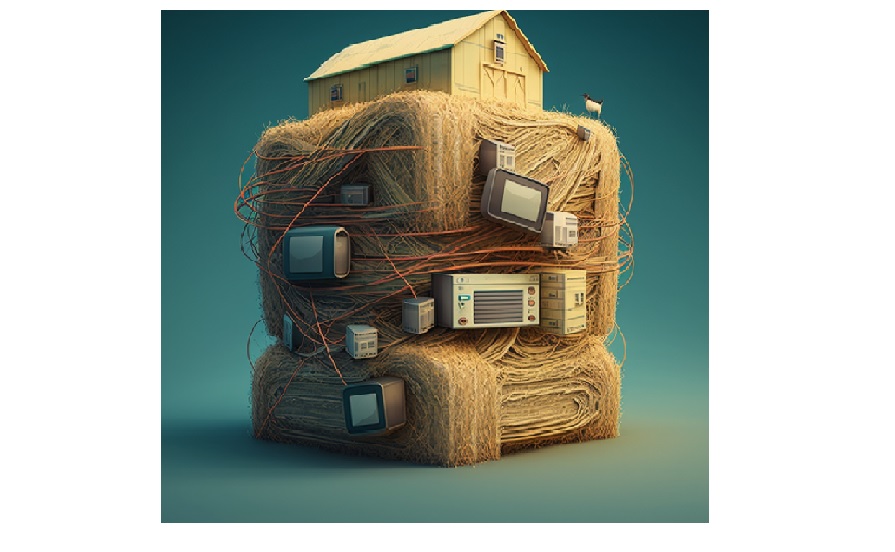
Graphana :Grafana is an open-source data visualization and monitoring tool. It allows users to create and share dashboards that display time-series data from various data sources such as Prometheus, Elasticsearch, InfluxDB, Graphite, and many more. Grafana is a popular and powerful platform for visualizing and analyzing time-series data. It is used by DevOps and system administrators to monitor and alert on performance metrics, such as CPU and memory usage, network and disk throughput, and application response times.
Docker installed- User: admin Password admin
Data modeling is the process of designing a data model for a given system. A data model is a collection of tables, relationships, and rules that govern how data can be stored and accessed. Data models are divided based on if they represent the business perspective (physical model) or the technical design (logical model).
Haystack is an open-source search engine used to build searchable databases. It is designed to enable users to quickly and easily create searchable databases of content, such as documents, images, videos, and audio files. Haystack is designed to be flexible, allowing users to customize the database structure and search options to suit their needs. (Haystack Explain By Siemens)
(We may see Tag name or Tagfunction in project Haystack Doc)
Project Haystack’s semantic model is structured into three layers:
- Vocabulary: giving our tag names formal definitions as terms
- Taxonomy: organizing our terms into a subtype tree
- Ontology: modeling more complex relationships between definitions
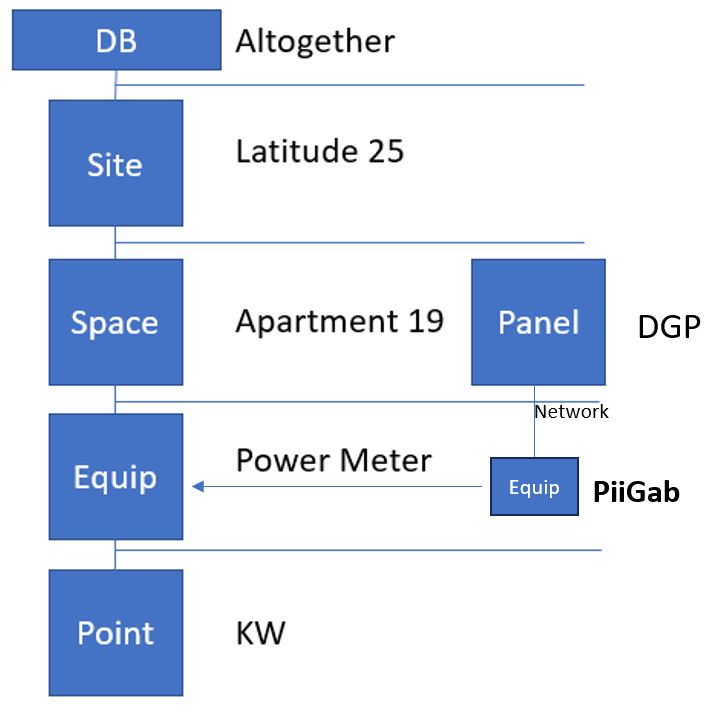
Entity
is a term used in Project Haystack to refer to a particular piece of data or system. Entities are used to group and categorize data in order to make it easier to search and analyze. For example, a temperature sensor may be an entity. Entities model things from the real world like buildings, rooms, equipment, and sensors. An entity in Haystack is always modeled as a collection of tags.
Below are main Entity defined although we can define our Entity aswell
site: single building with its own street address
space: location or zone within a site
equip: physical or logical piece of equipment within a site
point: sensor, actuator or setpoint for an equip (Time Series Entity). The Subtype / Marker are cmd/sensor/sp which are pointFunction. these subtype are boolean and may exist or not. e.g point entity could have sensor. which means sensor does not get value like tag (Does not have : ). Basically a point with subtype sensor means it is a sensor (DI/AI).
his is another subtype which used for time series data. in fact his must be exist in time series point
weatherStation: weather station observations
device: computers, controllers, networking gear
Tag
is a term used in Project Haystack to refer to a piece of meta data that describes a particular piece of data. Tags can be used to give additional context to data, such as its location, manufacturer, or type. Tags can also be used to group data together, making it easier to search and analyze.
Name: Defines the unique identifier of an entity in a system. Name is not mandatory in the Entity BUT if you do use it then it must be unique in the same entity. e.g entity Point with name “energy” we can have same name in entity equip.
Tag Type Marker
A marker tag is merely an annotation with no associated value. Marker tags are used to indicate a “type”
or “is-a” relationships. For example, Applying the ahu tag to an entity indicates that it’s an “Air Handler
Unit which heats and/or cools air”.
Tag Type Str
A string (str) tag has an associated text value. Str tags are commonly used for human readable
descriptions. For example, the dis tag is used for an entities display name ‘Incoming Energy Meter’,
geoAddr is used for defining the street address ‘455 Larkspur Dr. Baviera, CA 92908’.
Tag Type Ref
Ref tags are assigned values of other entities to help us define how entities within a data model relate to
one another. For example, we can associate an equip entity to a particular site entity via siteRef, or
associate a point to a particular equip via e quipRef
Other Tag Types
The remaining tag kinds used in Project Haystack are listed below:
● Bin: a binary blob with a MIME type formatted as Bin(text/plain)
● Bool: boolean “true” or “false”.
● Coord: geographic coordinate in latitude/longitude formatted as C(lat,lng)
● Date: an ISO 8601 date as year, month, day: 2011-06-07.
● DateTime: an ISO 8601 timestamp followed by timezone name: 2011-06-07T09:51:27-04:00
New_York
● NA: singleton value which represents not available for missing data
● Number: integer or floating point number annotated with an optional unit of measurement.
● Time: an ISO 8601 time as hour, minute, seconds: 09:51:27.354.
● Uri: a Universal Resource Identifier.
● XStr: extended typed string which specifies a type name a string encoding
collection
There are also three collection tag kinds in which more than one tag type could be involved:
● List: list of zero or more values of any type
● Dict: an associated array of name/value tag pairs
● Grid: a two-dimensional table of columns and rows, see Grids
Data Type:
In Json
– n: Number
– b: Boolean
– o: Object
– a: Array
– d: Date
– t: Timestamp
– j: JSON
– m: marker (exist->true)
– s: String
-c: coordinate /C(latitude,longitude)
The “r:” indicates that the value is a reference. This is a common convention used when defining the data type of a value in a JSON file.
A reference type is a type of data type in which a value refers to a separate object or data structure. This can be used to create relationships between different objects or data structures in a JSON file.
The relation between an ID and a Reference in Project Haystack is that an ID is a unique identifier for a particular resource, while a Reference is a URL or URI that points to the resource. For example, a siteRef is a specific identifier for a site, which can then be used to construct a Reference to the site in the form of a URL or URI.
IDs are usually created automatically when a new resource is added to Project Haystack. This allows for easy identification and retrieval of resources.
Reference is generated by
Filter
we need to identify the type of value we are sending as part of the name. If it is not a reference type, it must be in quotes (” “). For reference types, we use the “@” symbol.
e.g:
{
“meta”: {
“ver”: “2.0”
},
“cols”: [
    {
        "name": "limit"
    },
    {
        "name": "filter"
    }
],
"rows": [
    {
        "filter": "s:siteRef==@300george and elec",
        "limit": "n:20"
    }
]
}
we cannot put quotation marks (” “) inside quotation marks (” “). Instead, we use the forward slash character (“\ \”) to separate the quotation marks. For example, “s:name==\”sitename\””. please note that the type for the whole query in JSON required to be identified.
e.g.:
{
“meta”: {
“ver”: “2.0”
},
“cols”: [
    {
        "name": "limit"
    },
    {
        "name": "filter"
    }
],
"rows": [
    {
        "filter": "s:name==\"300george\""   ,
        "limit": "n:20"
    }
]
}
Applying Haystack Tagging for a sample building
IIoT Standard
ISA-95 is a hierarchy model developed by the International Society of Automation (ISA) for modelling and improving enterprise and control systems integration. It builds on the traditional tiers of information technology (IT) and operational technology (OT) systems to create a five-layer model that includes corporate, site, area, production, and control. This hierarchical model enables businesses to align their IT and OT strategies to optimize production processes and improve organisational communication and collaboration.
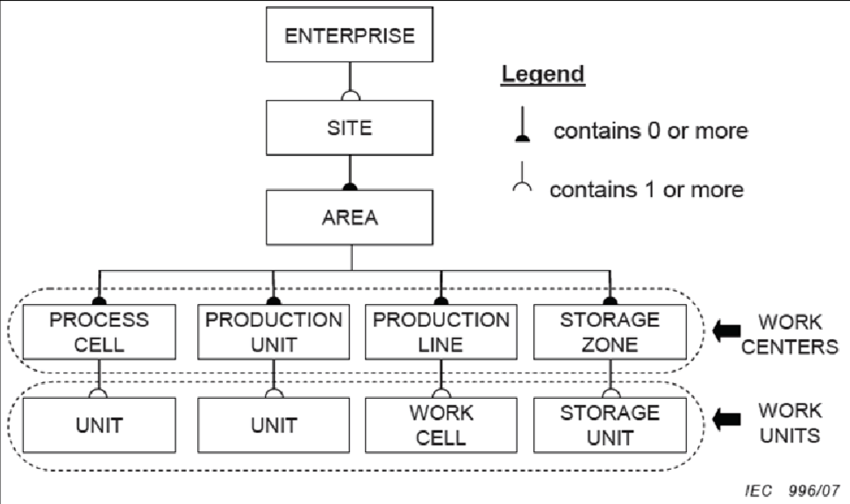
ISA 95 essentially provides a hierarchical Enterprise, Site, Area, Line, and Cell model. Each level of this architecture uses a specific software system to gather data for that part of the organization’s needs, creating a communication problem between these disparate applications.
The five layers of the ISA-95 Hierarchy Model are:
• Corporate: This layer manages corporate-level planning and decision-making.
• Site: This layer focuses on the organizational personnel and processes that manage and control a facility. • Area: This layer is responsible for scheduling, production planning, resource planning, and forecasting.
• Production: This layer focuses on machines, parts, and processes used to produce a product or service.
• Control: This layer handles detailed functions such as process control, monitoring, and alarm management.
Each layer in the model provides different functionality for different purposes. The Corporate layer provides top-level control over the organization, while the Site layer focuses on personnel and processes that handle day-to-day functions. The Area layer is where most production-related activities take place, while the Production layer focuses on the actual production process and equipment. Finally, the Control layer directly controls and manages the entire system.
Ontology
ul { list-style-type: none; position: relative; padding-left: 20px; } ul li { position: relative; } ul li::before { content: ”; position: absolute; top: 0; left: -10px; border-left: 1px solid black; height: 100%; } ul li::after { content: ”; position: absolute; top: 0; left: -10px; border-top: 1px solid black; width: 10px; } ul li ul { margin-top: 10px; }- Site
- @site:SystemS
- @Site:SpaceS
- @Site & @Space: EquipS
- @Site & @Equip: PointS
Model
Project Haystack LinksSite Information
id:
dis:
area:
tz:
weatherStationRef:
geoAddr:
geoStreet:
geoCity:
geoCountry:
geoPostalCode:
geoCoord:
yearBuilt:
Space Information
1 Data Center: Space used to house computer and networking gear
1 Floor
- Ground Floor Floor at ground level
- Roof Floor The roof floor is the topmost level of a building
- Subterranean Floor Floor below ground level
1 Room Enclosed room of a building
Zone
- HVAC Zone Space Zone related to conditioning of a space’s air temperature and quality
- Lighting Zone Space Zone related to lighting system
id:
dis:
area:
siteRef:
spaceRef:
Space

 Electrical Engineer