
Architect
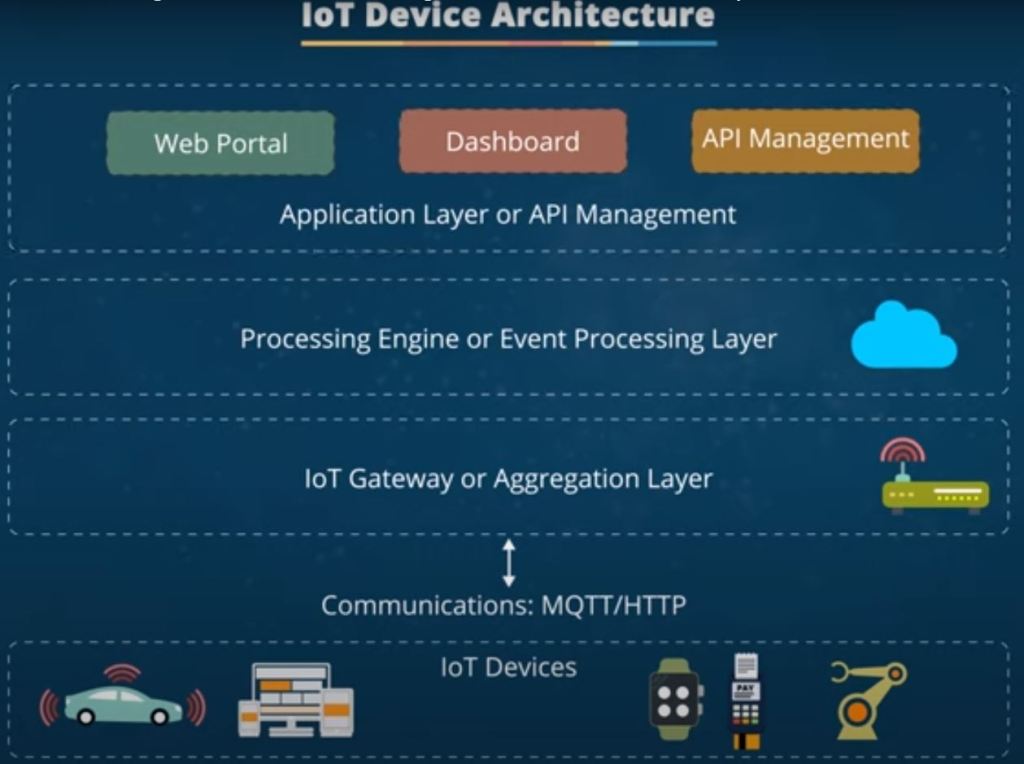
Today, the Internet of Things (IoT) has become a powerful tool for connecting devices and machines, collecting data, and performing various tasks. The IoT architecture is divided into five layers – the IoT device layer, communication layer, gateway or aggregation layer, processing engine layer, and application layer – providing a structure for connecting devices, collecting and managing data, and developing applications.
Device layer of an IoT system consists of various connected devices that collect data and communicate with each other. These may include sensors, actuators, and other smart devices embedded in machines or everyday objects. This layer is the backbone of the IoT system as it links the physical and virtual worlds of the web. The perception layer of an IoT system architecture, also known as the device layer, consists of multiple elements – sensors, cameras, actuators, and similar devices that gather data and perform tasks.
The fifteen most utilized sensor types in loT comprise the following: Passive Infrared (PIR), Ultrasonic, Pressure, Level, Temperature, Humidity, Gas, Light (Optical), Motion (PIR and Microwave), Magnetic Field (Hall Effect), Smoke/Fire, Flow/Velocity, pH Sensor, Water Quality Sensor, and Carbon Monoxide Sensor.
Communication layer in an IoT system allows data to travel between the device layer and other system parts. This layer includes cellular networks, Wi-Fi, Bluetooth, LANs, and other communication protocols and technologies. It is crucial for transferring data between devices, applications, and cloud systems. It also helps manage security protocols and authentication measures to protect data. It is also responsible for routing data between devices and coordinating communication between an IoT system’s layers.
MQTT is a layer over TCP, whereas CoAP works over UDP. and both are application-layer protocol for IoT. MQTT, CoAP and Apache Kafka are messaging protocol for communication between IoT devices and servers.

General IoT platform capability
- IoT Services:
- Connectivity: Securely connecting a wide range of devices to the platform, handling various communication protocols and data formats.
- Storage: Efficient storage solutions for IoT data, accommodating the high volume and velocity of data generated by devices, with strategies for data lifecycle management.
- Queue Service: Messaging and queuing mechanisms to support reliable data transmission, asynchronous processing, and integration of services within the IoT ecosystem.
- Access Management:
- Administration: Oversee and control the IoT platform, including system settings and configurations.
- Tenant Management: Segregation and management of different user groups or organizations within the platform, ensuring data isolation.
- *User Management: Creation and governance of user accounts, defining roles, and managing permissions, along with secure authentication and authorization mechanisms. There is a well-known access management system in software called Role Based Access Control (RBAC).
- Asset Management:
- Device Management: Registration, tracking, and management of IoT devices within the platform. What data must be sent via the device, How it need to be sent, Firmware tracking etc.
- *Metadata Management: Extension and customization of asset information by defining additional attributes or properties for each device.
- *Event Services: Capturing, processing, and managing events or alerts generated by devices, facilitating event-driven responses and workflows.
- Software Services: (Customer Requirements.- Industry Base)
- *API and Backend Services: A suite of APIs and backend services enabling the development, integration, and extension of applications, facilitating access to platform capabilities and data.
- *UI and Frontend Services: Tools and frameworks to build user interfaces and frontend applications for interacting with the IoT platform, enhancing user engagement and data visualization.
- *Analytic Services: Advanced analytics and data processing capabilities, including real-time analytics, machine learning, and predictive modeling, to derive actionable insights from IoT data.
Mindsphere
Cloud Service in general: Infrastructure as Service/Software as Service/ Platform as Service
Mindsphere
Pricing Model:
Insights Hub Basic Capability Package
Insights Hub IIoT Data Package XS
Insights Hub Asset Attributes Pay as using other options are available
Price and Configure tool
Midsphere High-level Architecture
- Applications: Consider these as different tools or programs that work on MindSphere. Siemens’ experts and other companies make them do various tasks.
- Open PaaS: This is like the space or environment where MindSphere operates. It’s on the internet, in secure places, and has everything needed to work smoothly.
- Connectivity: Siemens tool called MindConnect is used for communication with Mindsphere. Communication with MindSphere is not limited to MindConnect. Some new products, like the PLC1500 series, can directly connect with MindSphere. Also, MindSphere supports MQTT/HTTP.
While MindSphere is focused on delivering industrial-specific IoT solutions, AWS IoT offers a more generalized, adaptable framework that serves various sectors.
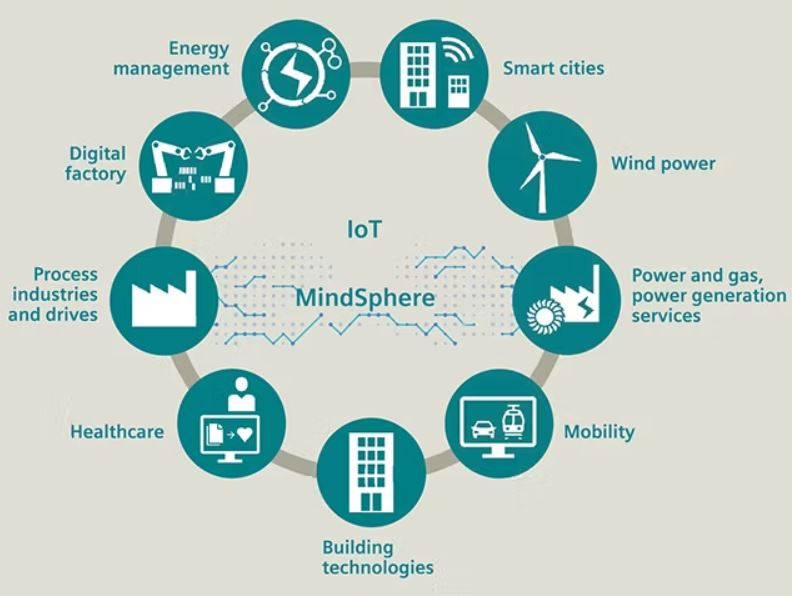
Core Platform Services:
- 1- Access Management
- User management (Role Base),
- Tenant Subtenant Management: Tenants are physically separated data spaces with a separate URL, with a specific set of users, a separate application management
- 2- Infrastructure Management
- Device Management:
- Asset Management: An asset management strategy involves the systematic deployment, operation, maintenance, upgrade, and disposal of assets.
- Property Management
- Event Services
- 3- IoT services
- Connectivity
- Storage
- Queue service
- 4- Software service
- API and backend
- UI and front-end : As it
- Analytic Services
Thingsboard
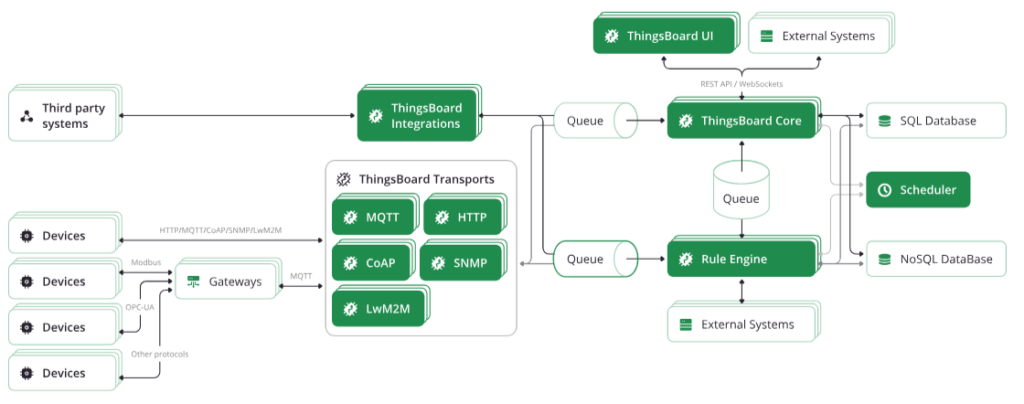
Platform Integrations vs IoT Gateway
The functionality of Integrations feature partially overlap with functionality of IoT Gateway. However, there are key differences between these two systems/features:
Gateway is Local: IoT Gateway is designed for local network deployments, Integrations are designed for server-to-server integrations.
Gateway is NOT Cluster based: IoT Gateway is designed to support < 1000 devices, while Integrations are designed for high throughput, scalability and cluster deployments as part of ThingsBoard server.
Gateway is light separate APP: Gateway is Gateway recompilation and restart is required to add custom payload decoder while Integration Converter is a JS function that may be modified in real time.
As you can see, both systems are important and applicable in different use cases.
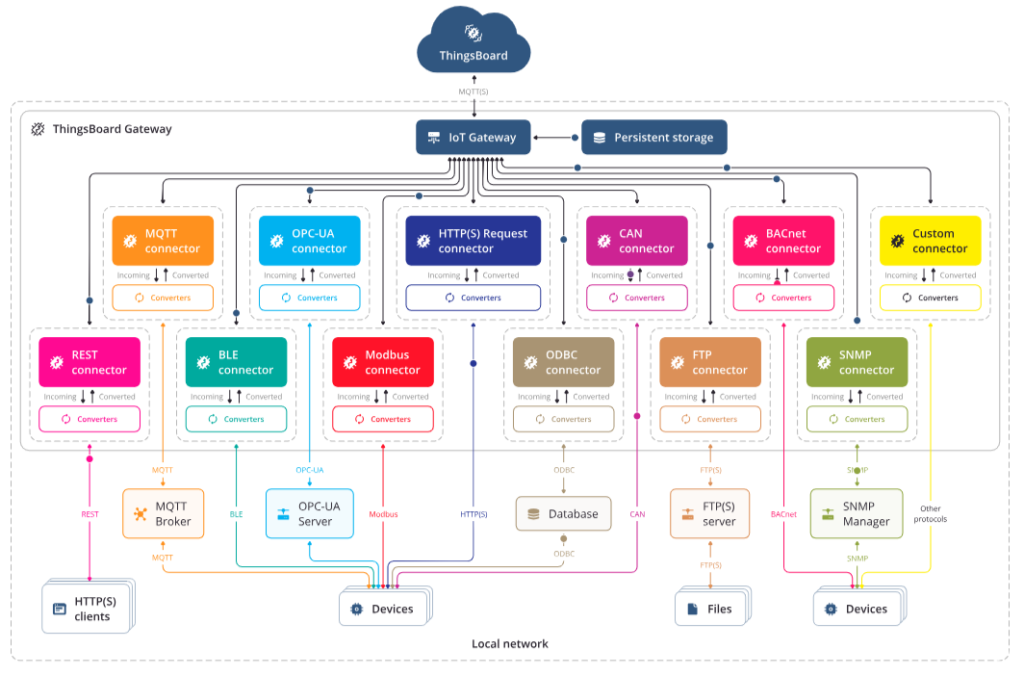
First, we have to add Gateway device to your ThingsBoard instance. To connect Gateway to Thingsboard we can use Docker or connect it manually.
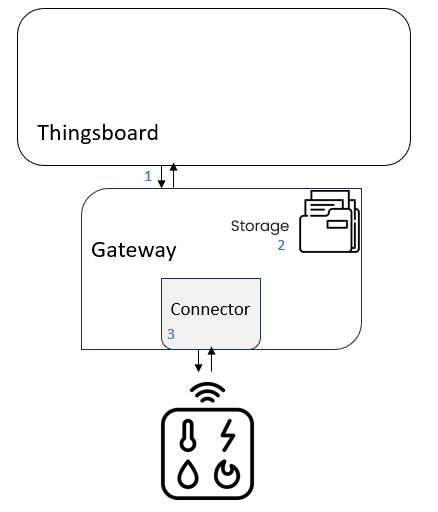
- Section thingsboard: Mqtt (https://thingsboard.io/docs/iot-gateway/configuration/)
- File: /etc/thingsboard-gateway/config/tb_gateway.json
- Section storage
- Storage subsection provides configuration for saving incoming data before it is sent to ThingsBoard platform. There are 2 variants for this section: memory or file
- File: /etc/thingsboard-gateway/config/tb_gateway.json
- Section connectors : TCP (https://thingsboard.io/docs/iot-gateway/config/socket/)(https://thingsboard.io/docs/iot-gateway/guides/how-to-enable-remote-configuration/)
- File: /etc/thingsboard-gateway/config/tb_gateway.json
Role Base Access Control

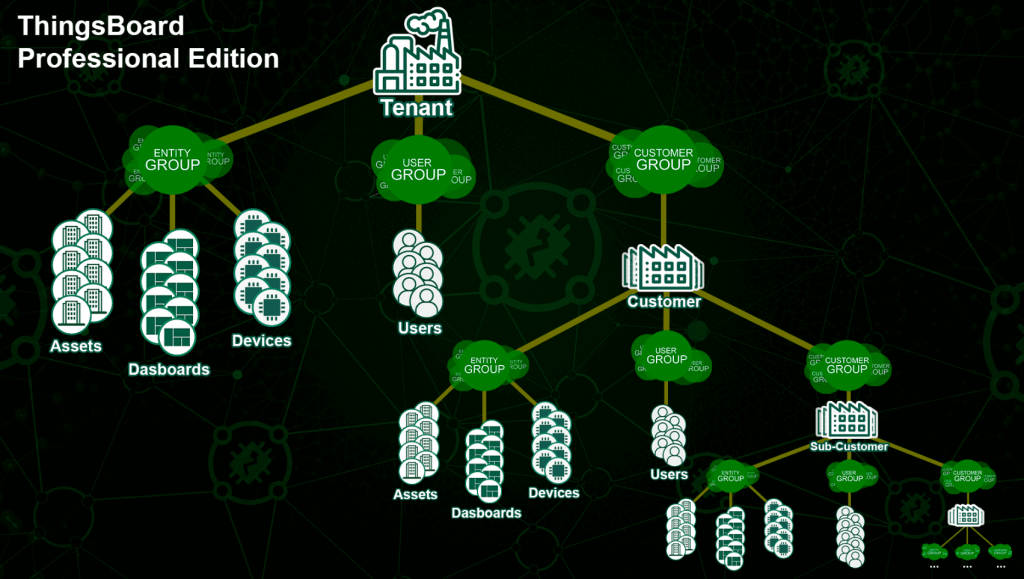
Default User and Pass
login : [email protected]
password – sysadmin
SysAdmin is responsible for the overall management and maintenance of the system
login : [email protected].
password – tenant
1- Create Device Profile
A device profile in ThingsBoard is like a blueprint for devices. It defines how they behave, how they communicate, and how their data is processed.
- Transport Type: The transport type defines how the device communicates with ThingsBoard. For example, DEFAULT typically means the device can use multiple protocols like MQTT, HTTP, or CoAP
- Provision Type: The provision type determines how devices are added to the platform. If set to DISABLED, devices must be added manually. Other options allow automatic provisioning using keys or certificates. The provision device key is used for automatic device provisioning.
- The profile data section contains the core configuration for the device profile.
- Configuration: Defines general settings for the device, such as how telemetry and attributes are handled. For example, it might specify the default time-to-live (TTL) for data.
- Alarms: Configures alarms for the device. For example, you can define a high-temperature alarm that triggers when the temperature exceeds a certain threshold.
- Propagation: Propagation determines how alarms are shared across the system. For example:
Propagate to Owner: Only the device owner sees the alarm.
Propagate to Tenant: All users in the tenant (organization) see the alarm.
Propagate to Related Entities: The alarm is shared with related devices or assets.
Power meter JSON file; for now 2 alarms – voltage less than 100 and current more than 1A.
2- Create Device
for bulk provisioning of devices in ThingsBoard, you need to follow the required format. Below is an example of a CSV file structure for creating devices.
“attributes” are essentially key-value pairs that hold information about your devices.
Server attributes: Server-only information. e,g A device’s location coordinates (latitude and longitude). The server might store this for mapping purposes. or A Max temperature threshold that is set by an administrator in the field.
Shared attributes: Server-to-device communication of settings. The ThingsBoard server can set them. A target firmware version.
OpenRemote
Username: admin
Password: secret
Realm is Tenant
Kapua
kapua-sys
kapua-password
Folders:
resource
Purpose: The resource folder is used to hold all the non-source code resources that are needed in the project. These resources are typically files and data necessary for the application but are not compiled like Java source files.
Temporary
- Project Coordinates and Metadata:
- groupId: This identifies your project uniquely across all projects. It’s often based on the organization’s domain name in reverse.
- artifactId: The name of the jar as it should be when deployed. It’s usually the project’s name.
- version: The version of the project. Maven also supports versioning schemes for SNAPSHOT versions (development versions).
- packaging: This defines the project’s packaging type, such as jar, war, etc.
- Dependencies:
- This section lists all the libraries that your project depends on to compile, test, and run. Each dependency is specified with groupId, artifactId, and version.
- Build:
- Defines project build settings, including plugin configurations. Plugins are tasks in Maven that can compile code, run tests, create JAR files, etc.
- Properties:
- This is used to define project-wide properties that can be referenced within the POM. Properties can be used to define things like version numbers for dependencies, encoding types, etc.
- Repositories:
- This section specifies the locations from where Maven can download project dependencies that are not present in the local repository.
- Distribution Management:
- This is used to define where project artifacts (JARs, WARs, etc.) are distributed to, for example, a central repository or a release repository.
- Dependency Management:
- This section is used in multi-module projects to define dependency versions without specifying them in each module’s POM.
- Profiles:
- Profiles allow for customizing the build for different environments (development, testing, production). They can override almost any part of the POM for a specific context.
- Modules:
- In multi-module projects, this section lists all the modules (sub-projects) that are part of the project.
- SCM (Software Configuration Management):
- This section includes information about the source control system used by the project, like Git or Subversion URLs.
- Build Extensions:
- These are used to extend the capabilities of Maven in the build process.
- groupId: This identifies your project uniquely across all projects. It’s often based on the organization’s domain name in reverse.
- artifactId: The name of the jar as it should be when deployed. It’s usually the project’s name.
- version: The version of the project. Maven also supports versioning schemes for SNAPSHOT versions (development versions).
- packaging: This defines the project’s packaging type, such as jar, war, etc.
Also on this post, you can learn more about the design of an IOT platform based on open-source tools and projects.
You can refer to kuzzle.io if you’re looking for a backend for the IoT.

 Electrical Engineer