
We use network basics in our daily lives. but we don’t know exactly what it does and how it works.
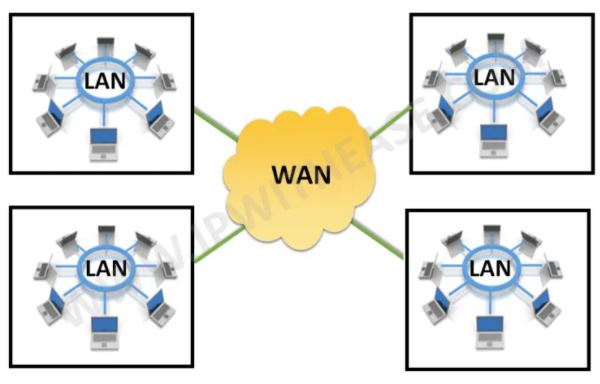
LAN: is Local Area Network. means that you will have a network, a set of devices talking to each other within a limited range. The best example of LAN is your home network wherein you have several laptops, mobiles, your printers connected to each other
WAN: is Wide Area Network.
IP: IP is a logical address to identify or locate your specific machine on a local area network. So suppose in this case the laptop IP addresses 192. 168. 1020. These are logical letters. Any device which wants to talk to this particular laptop can send a message to this particular IP address.
Switch: Switch is a device that sits within your local area network and helps you talk to various devices within your local area network range. For example, if you want to print a copy of your file from a printer, then you can simply send your request and the switch will identify that. this request needs to go to this particular IP address, So the switch specifically works within a closed range of a local area network. A Layer 2 switch only works with MAC addresses and doesn’t interact with any higher layer addresses, such as an IP. A Layer 3 switch, on the other hand, can also do static routing and dynamic routing, which includes IP and virtual local area network (VLAN)
HUB: A hub is a networking device that is used to connect multiple computers, servers, and other network devices in a single local area network (LAN). It typically serves as a central
Router: The router is a network device that sits between our local area networks and the outside network, which is a wide area network. So suppose our mobile wants to connect to the internet, then this mobile will send requests to the router, and then this router will connect to the outside internet.
A switch stores and uses the MAC address of a device to transfer data while a router uses the IP address of the device to transfer data between networks. A hub on the other hand does not store any MAC/IP address to transfer data.
VLAN: A VLAN is a local area network where computers, servers, and other network devices are logically connected regardless of physical location. e.g computer from the engineering team at the account level connects to the account switch physically BUT part of VLAN with other engineering PCs.
A VLAN (Virtual Local Area Network) is a way to build invisible, soundproof walls inside that warehouse. We are using the exact same physical building and the exact same physical network switches, but you are digitally carving it up into separate, isolated rooms
VLAN tagging is the process of adding a tag, or label, to a network packet, which allows it to be identified as part of a specific virtual local area network (VLAN). It is used to separate different types of network traffic and keep the traffic isolated from other networks. VLAN tagging is commonly used in virtual LAN (VLAN) networks. Untagging is the process of removing a VLAN tag from a packet before it is sent over the network. This is usually done to prevent the packet from being identified as part of a specific VLAN, or to allow it to travel to a different network.
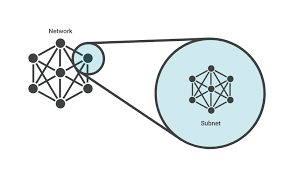
Subnet: How a machine would know whether it sits within the local area network or is sitting outside the main local network. How a machine can understand that that can be done through yet another concept which is called a subnet. So subnet is called as a subnetwork which sits within the local area network and it is not an IP address. Subnet might look like an IP address but it is not. It is a set of flags that defines the overall range of a local area network.
E.g:
203.193.193.0/25 – Find network, broadcast & valid host addresses.
- The network address is easy….203.193.193.0
Addr: 11001011.11000001.11000001.00000000
Mask: 11111111.11111111.11111111.10000000
AND: 11001011.11000001.11000001.10000000
Yields: 203.193.193.128 – this is the next subnet.
The broadcast address is one less than the NEXT subnet and so the broadcast address is 203.193.193.127Side note: https://www.subnet-calculator.com/subnet.php?net_class=B
Gateway: IP address of the router is Gateway. In fact, the IP address of the router is actually called the network gateway Also with a gateway we can connect two dissimilar networks like DeviceNet to ethernet as long as Bridge Connect two similar networks. Note that ISP protocol is NOT ethernet (e.g NBN FTTP, GPON, etc) and it is the reason home modem is a gateway (Ethernet to ISP protocol)
The router has basically four core functionalities that it has to deliver as a gateway device. First is NAT which is Network Address Translation, the second is DMZ which is Demilitarized zone, third is Firewall and fourth is Port forwarding.
Bridge
Bridges are used to control and limit the amount of broadcast traffic passing through a network. Bridges learn which network devices are on each side of the bridge and then forward traffic only to the appropriate segments. note that Gateways and bridges are two types of network devices that serve different purposes in a computer network. A gateway is a network device that connects two networks that use different protocols and allows data to be exchanged between them. A bridge is a networking device that connects two different physical segments of a network, such as two different Ethernet networks.
NAT: whatever request comes from the local area network device, the IP address of this particular device is not exposed to the internet router changes this network device address to a different address. The reason is IPv4 shortage of addresses and a normal flow would go to the router. the router will request that particular data from a device in the wide-area network and then that would be sent back to the device.
VPN: A virtual private network (VPN) is a mechanism for creating a secure connection between a computing device and a computer network, or between two networks, using an insecure communication medium such as the public Internet.
Firewall: if a device that is completely isolated somewhere in the network wants to talk directly to this particular device in the local area network. the firewall comes into the picture. A firewall is nothing but a set of passive rules which are defined to enable the set standards of communication between the internal and the external network. Through this firewall, only a specific set of communications can happen and these sorts of ad hoc requests cannot.
if you want to allow any sort of communication through this firewall, there are two options available
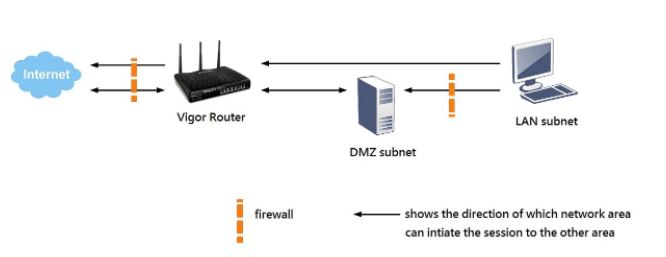
DMZ: Dmz is a Demilitarized zone. A demilitarized zone is a zone created within the local area network wherein it is specified to the router that whenever any ad hoc external network connection wants to try to establish a connection with the local area network, you simply pass on that connection to the DMZ. in another word if any request comes from an ad hoc device, it comes to the router and router, simply send it to this Dmitri zone. And if there is any device that is sitting here in the Dmitri zone, that device can directly talk to the device outside the firewall.
Port Forwarding: Port forwarding is another mechanism through which you can allow communication from the outside networks within the local area network through the firewall and the router. In the Port forwarding concept, you do not create a separate DMZ. You specify exactly on which particular Port of this particular device the communication needs to happen. In other words, you specify the device and the port (e.g 80 for HTTP) for Adhoc connection.
APN: An Access Point Name (APN) is the name of a gateway between a mobile network and another computer network. An Access Point Name (APN) provides all the details that your device needs to connect to mobile data. If you are setting up a new device or putting your SIM card into a device for the first time, your network operator should send you their APN details in a configuration message.
Server
Several types of servers are commonly used in communication networks, each serving a specific purpose. Servers like these handle a variety of network functions, from delivering email to resolving domain names. Here’s a brief overview of some common server types:
1. Web Server
- Purpose: Hosts websites, serving web pages to users through HTTP or HTTPS.
- Example Software: Apache, Nginx, Microsoft IIS.
2. Email Server
- Purpose: Manages the sending and receiving of emails.
- Components: Usually consists of two main components – an SMTP server for sending emails and a POP3/IMAP server for receiving emails.
- Example Software: Microsoft Exchange, Postfix, Exim.
3. Database Server
- Purpose: Stores and retrieves data as requested by other software applications.
- Example Software: MySQL, PostgreSQL, Microsoft SQL Server, Oracle Database.
4. DNS Server
- Purpose: Translates domain names into IP addresses, enabling users to access websites using familiar domain names instead of IP addresses.
- Example: BIND (Berkeley Internet Name Domain), Microsoft DNS.
- 4.1 mDNS : mDNS (Multicast DNS) is like a local mini-DNS that lets devices find each other on the same network without needing a central DNS server.
- 4.2 DDNS (Dynamic DNS) automatically updates a domain name (like
rpi01.ddns.net) to match a device’s changing public IP address.
5. DHCP Server
- Purpose: Automatically assigns IP addresses and other network configuration parameters to devices on a network.
- Example: ISC DHCP Server, Microsoft DHCP Server.
6. VPN Server
- Purpose: Provides secure access to a private network over the internet.
- Example Software: OpenVPN, SoftEther VPN.
7. Proxy Server
- Purpose: Acts as an intermediary for requests from clients seeking resources from other servers. It can provide functionalities like caching, content filtering, and load balancing.
- Example Software: Squid, NGINX.
8. FTP Server
- Purpose: Transfers files using the File Transfer Protocol (FTP).
- Example Software: FileZilla Server, vsftpd.
9. File Server
- Purpose: Stores and manages access to files. Allows users on a network to store files, share them with others, and access them remotely.
- Example Protocols: SMB (Server Message Block), NFS (Network File System).
10. Authentication Server
- Purpose: Manages security and access controls, verifying login credentials and authorizing access.
- Example: RADIUS, Kerberos.
11.NTP Server:
- Purpose: Synchronizes the clocks of network-connected devices to ensure accurate timekeeping across a network. This is crucial for logging events, security, transaction time-stamping, and other time-sensitive operations.
- Example Software: NTPd (Network Time Protocol daemon), Chrony.
Ethernet/IP (Industrial)
Let us separate the terms between Ethernet and IP. Ethernet is not a connection type and It is an IEEE protocol. We typically just say that we are connected via Ethernet or wireless as it is easier to go through lots of jargon. And IP correlates to industrial protocol.
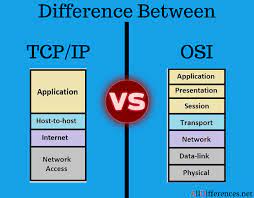
TCP/IP protocol: 4 Layer Model
1- Application Layer
2- Transport Layer
3- Internet Layer
4- Network Interface
OSI Protocol: 7 Layer Model
1- The physical layer: Layer one is concerned with transmitting data bits over physical mediums. This layer provides mechanical, electrical and other functional aids available to enable or disable, they maintain and transmit bits about physical connections. USB-Bluetooth are famous example
2- Data link: Layer two specifies transmission of frames between connected nodes on the physical layer. The object of the data link layer (also section link layer, connection level, procedure level) is to ensure a reliable, that is largely error-free transmission and to control access to the transmission medium. IEEE 802.11 (wireless LAN) – I²C are some sample
3- Network: Addressing, routing and traffic control of a multi-node network is described by Layer three.The network layer (also packet level) provides a defined benefit services for switching connections and packet-oriented services for the relaying of data packets. IPv4/IPv6 is a sample for this layer
4- Transport: Segmentation, acknowledgement and multiplexing between points on a network is defined at Layer four. The tasks of the transport layer (also end-to-end control, transport control) include the segmentation of the data stream and in relieving congestion. TCP and UDP are famous protocol in this layer
5- Session: Layer five looks at the continuous data exchange between two nodes. The session layer works as a dialogue controller through which it allows systems to communicate in either half-duplex mode or full-duplex mode of communication. This layer is also responsible for token management, through which it prevents two users from simultaneously accessing or attempting the same critical operation. The services offered by Session Layer are generally implemented in application environments using remote procedure calls (RPCs). NetBios is a sample of this layer
6- Presentation: Encoding, data compression and encryption / decryption between a network service and application happens at Layer six. Example are SSL, FTP (server), AppleTalk Filing Protocol,Telnet
7- Application: Resource sharing, high level APIs and remote file access is defined by Layer seven.Examples are Hypertext Transfer Protocol (HTTP), File Transfer Protocol (FTP), Post Office Protocol (POP), Simple Mail Transfer Protocol (SMTP), and Domain Name System (DNS).
Layers 1, 2 and 3 are Media Layers while layers 4, 5, 6 and 7 are Host Layers.
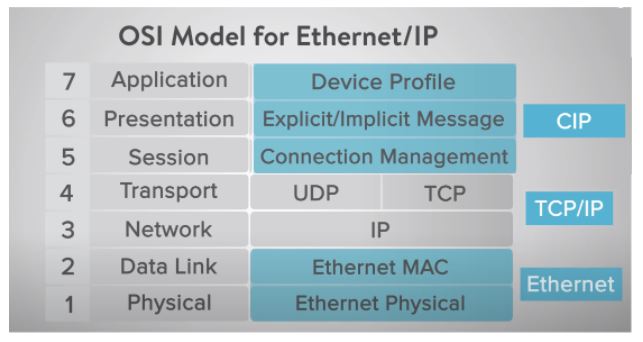
The IP part in Ethernet/IP is Industrial Protocol. IP part of this protocol is simply the use of the Ethernet infrastructure in conjunction with the industrial protocol which used common Industrial Protocol or CIP layers that are combined with TCP IP or User Datagram Protocol or UDP layers. So Ethernet/IP protocol is a conjunction of 2 protocols.
The physical layer is everything related to the physical things. for example the cabling or frequency. the 1 voltage or condition etc.
TCP vs UDP: TCP is a connection-oriented and send-receive acknowledge the relationship. The packets go down the stack received at the device connected to your network. A receipt confirmation goes back up the stack to the applications layer
UDP is a connectionless protocol and with the UDP protocol, there is a continuous transmission, not requiring a receipt/Acknowledgment this protocol would be used
CIP: Cip uses Object-oriented design to present things like a device profile for a VFD. If you’ve ever used a CIP message instruction within your Plc device, you know that you research the type of data you desire such as frequency, speed or faults and you add that assembly number to your CIP instruction. The data exchanged is a number of data registers that you in turn map to your Tags for desired data. This CIP is compatible with many standard Ethernet switches used within the industrial automation arena, which makes it easy to implement.
In a nutshell, Ethernet IP is Ethernet packets used with the industrial protocol of CIP, TCPIP and UDP layers to provide the required data to your controller.
Token passing is a communication protocol used in telecommunications. The system uses a signal called a token to limit when a device can transmit on the network. Only the device with the token can transmit. When that device is done, the token is sent to the next device.
Token-passing is a type of network access control, which is used in decentralized networks. It is based on the principle of passing a single token from node to node in a controlled sequence. This token contains control information that grants permission for the node to send data through the network. The token is passed in a circular pattern around the network, and the node at which the token is received is the only node that is allowed to transmit. Token-passing is not a master-slave protocol. Even BACnet MSTP is Multi mater protocol
ARP Address Resolution Protocol
ARP is a protocol used to find the physical address (e.g., MAC address) of a device from its IP address on a local network.
Packet Analise
Wireshark is a free and open-source packet analyzer. It is used for network troubleshooting, analysis, software and communications protocol development, and education.
PCAP files are data files created using a program. These files contain packet data of a network and are used to analyze the network characteristics. They also contribute to controlling the network traffic and determining network status.
TCPdump is a packet analyzer that is launched from the command line. It can be used to analyze network traffic by intercepting and displaying packets that are being created or received by the computer it’s running on.
Network Analysis
Nmap (Network Mapper) is an essential tool for active network discovery and security auditing. It is used to discover devices running on a network and interrogate
them
to determine what services they offer.
By sending specially crafted packets and analyzing the responses, Nmap can create a “map” of the network, identifying live hosts, open ports, and even the operating system or software version
in use. This makes it an indispensable utility for network administrators assessing their infrastructure and security professionals testing for potential vulnerabilities.
Field Data Devices
- Data Acquisition Server Keyword is Server : It is Destination
- Communication Processor : Keyword is Processor Designed for Delivery
- RS485 Gateway : Keyword is Gateway – Change Protocol
- Media converter : Dumbest – Just change physical layer – e.g 232 to 485

 Electrical Engineer